NBI Clearance QR Code: How to Scan & Verify (2026)
Every genuine NBI Clearance QR code links straight to the official NBI database, letting anyone confirm in seconds whether a clearance is real, active, and belongs to the person presenting it. This guide walks through exactly how to scan and verify an NBI Clearance QR code — for employers checking a new hire’s documents, landlords screening tenants, or applicants double-checking their own card.
Quick answer: Open your phone’s camera or a QR scanner app, point it at the QR code printed on the back of the NBI Clearance card, and tap the link that appears. It should open clearance.nbi.gov.ph and immediately display the holder’s photo, name, and status (Valid or Invalid). No app installation or account is required.
How to Scan the NBI Clearance QR Code
Scanning the NBI QR code takes under a minute and works on any modern smartphone — no special app required. Follow these steps:

Open your camera app
Most iOS and Android phones can scan QR codes directly through the built-in Camera app — no separate scanner app needed. If your phone is older, download any free QR scanner from the App Store or Play Store.
Locate the QR code on the clearance
On the current card-format NBI Clearance, the QR code is printed on the back of the card, next to the thumbprint and reference number.
Center the code in the frame
Hold the camera steady, roughly 10–15 cm from the card, until the code is fully inside the frame and in focus. A notification or on-screen link should appear within a second or two.
Tap the link and check the domain
Tap the notification. Before entering any information, confirm the link opens an official .gov.ph address — specifically clearance.nbi.gov.ph. If it redirects anywhere else, stop and treat the document as suspicious.
Compare the on-screen result to the physical card
The verification page displays the holder’s photo, full name, and clearance status. Check that the photo matches the person in front of you and that the name matches the printed card exactly.
Reading the Verification Result
After scanning, the portal returns one of two outcomes:
The clearance is authentic, currently active, and the record matches what’s printed on the card. Safe to accept for employment, visa, or transaction purposes.
The clearance is expired, the code doesn’t match any record, or the document may be forged. Do not accept it — ask the holder for a current, verifiable clearance instead.
If the result looks incomplete, or the photo doesn’t clearly match, don’t rely on the QR result alone — cross-check the reference number manually on the portal, or direct the person to have it verified at an NBI branch in person.
Verify Without Scanning (Reference Number Method)
No camera handy, or the QR code itself won’t scan? You can still verify an NBI Clearance manually:
- Go to the official NBI Clearance Online portal and open the verification section.
- Locate the Reference Number printed on the clearance (a 10–12 digit code, typically near the top or back of the card).
- Type the number exactly as printed — one wrong digit will return a false “not found” result.
- Tick the “I’m not a robot” box and click Verify.
- Compare the result against the physical card the same way you would for a QR scan.
How to Spot a Fake Using the QR Code
A forged NBI Clearance usually fails in one of these ways when scanned:
| Warning Sign | What It Means |
|---|---|
| QR code won’t scan at all, or shows a broken/blurry pattern | Likely a printed or photocopied fake — genuine cards use security printing that scans cleanly |
| Link opens a non-.gov.ph website | Fraudulent redirect — close immediately and do not enter any personal data |
| Verification page shows “Invalid” or “Not Found” | The record doesn’t exist, is expired, or the printed reference number was altered |
| Photo on screen doesn’t match the card or the person | Possible identity swap — the physical card may belong to someone else |
| Card feels laminated or the QR code is damaged | Lamination can distort or destroy the scannable code — many employers reject laminated cards for this reason |
NBI Clearance QR Code Not Working? Try This
If the QR code won’t scan or the verification page won’t load, work through these fixes in order before assuming the document itself is invalid:
- Clean the camera lens and improve lighting — smudges and glare are the most common reason a scan fails on a genuine card.
- Hold the card flat — a curved or creased card distorts the code pattern enough to break the scan.
- Check your internet connection — the QR code only stores a link; your device still needs data or Wi-Fi to load the verification page.
- Try the Reference Number method instead (see above) — this bypasses the camera entirely.
- Confirm you’re not on a fake look-alike site — always type or bookmark clearance.nbi.gov.ph directly rather than following links from search ads or unofficial pages.
- If it still fails after all of the above, the safest move is to verify in person at the nearest NBI branch, or contact NBI through our Hotline & Contact Directory.
Where Is the QR Code Located?
On the current card-style NBI Clearance, the layout is:
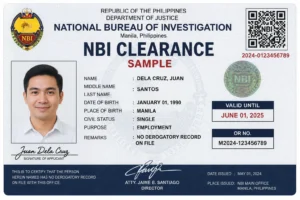
- Front of card: photo, full name, birthdate, and clearance result
- Back of card: home address, reference number, right thumbprint, QR code, and validity date
For a full breakdown of every field on the card, see our NBI Clearance Sample guide. Once you’ve confirmed your card is genuine, you can review current requirements in our NBI Clearance Requirements page or check how long your clearance stays valid in our NBI Clearance Validity guide.
Frequently Asked Questions
How do I scan an NBI Clearance QR code?
Open your phone’s built-in camera, point it at the QR code on the back of the card, and tap the link that appears. It should open clearance.nbi.gov.ph and show the holder’s photo, name, and status within seconds.
What if my NBI Clearance QR code is not working?
Clean your camera lens, make sure the card is flat and well-lit, and check your internet connection. If it still won’t scan, use the Reference Number verification method on the official portal instead, or visit an NBI branch in person.
Do I need an app to scan the NBI QR code?
No. Any modern smartphone camera can scan it directly — no download or account required.
Can I verify an NBI Clearance without the physical card?
Yes. As long as you know the Reference Number printed on the card, you can enter it manually on the official verification portal without needing the QR code at all.
What does it mean if the NBI QR code shows “Invalid”?
It means the clearance is expired, the record doesn’t match, or the document may be forged. Do not accept it for employment, visa, or legal purposes — ask for a current, verifiable clearance instead.
Is scanning the QR code the same as full NBI verification?
It’s the fastest method, but for high-stakes checks (large employers, agencies), also compare the photo and name on-screen against a valid government ID presented in person, since a scan alone confirms the record exists but not necessarily who is holding the card.
Always verify using the official portal at clearance.nbi.gov.ph. This page is for general guidance only and is not legal advice; for suspected fraud or a forged document, report it to your nearest NBI office using our Hotline & Contact Directory.