NBI Clearance Problems and Solutions: The Ultimate Troubleshooting Guide for 2026
Fact Checked: July 27, 2026 | Reviewed by: NBI Online Clearance PH Editorial Team | Reading Time: 28 minutes
Transparency Statement: NBI Online Clearance PH is an independent informational website. We are not affiliated with, endorsed by, or connected to the National Bureau of Investigation (NBI), the Department of Justice (DOJ), or any Philippine government agency. This guide provides educational troubleshooting information only. We cannot access your NBI account, resolve your application issues, or intervene in official NBI processes. For official support, always contact the NBI directly through clearance.nbi.gov.ph or visit an NBI branch.
Introduction: Navigating NBI Clearance Problems with Confidence
Applying for an NBI Clearance should be straightforward, but technical glitches, system errors, and procedural roadblocks often turn the process into a frustrating experience. Whether you are facing a login failure, a payment that won’t confirm, a dreaded HIT status, or an appointment that seems impossible to book, NBI Clearance problems can delay your employment, travel, or government transactions.
This comprehensive NBI Clearance problems and solutions guide is designed to be your single source of troubleshooting truth. We have cataloged the most frequent issues reported by applicants across the Philippines, analyzed their root causes, and compiled step-by-step solutions that work. From forgotten passwords and website downtime to biometrics errors and release delays, every major problem category is covered with actionable fixes.
Our team has researched official NBI system documentation, aggregated user experiences from dozens of NBI branches, and verified solutions against the latest NBI Clearance portal behavior to create the most complete NBI Clearance troubleshooting resource available online.
Key Takeaways
- Most problems have solutions. Very few NBI Clearance issues are permanent dead ends. Patience and the correct procedure resolve nearly all cases.
- Your reference number is your lifeline. Without it, resolving any application issue becomes exponentially harder.
- Payment delays are common. Over-the-counter payments can take up to 24 hours to reflect. E-wallet payments are faster.
- HIT status is not a conviction. It is a name-matching flag that requires manual verification. Cooperate fully and it will resolve.
- We cannot fix your problems directly. This guide teaches you how to solve them yourself through official channels.
- Branch visits resolve what online tools cannot. For persistent system errors, an in-person inquiry at an NBI branch is often the most effective escalation.
Most Common NBI Clearance Problems Overview
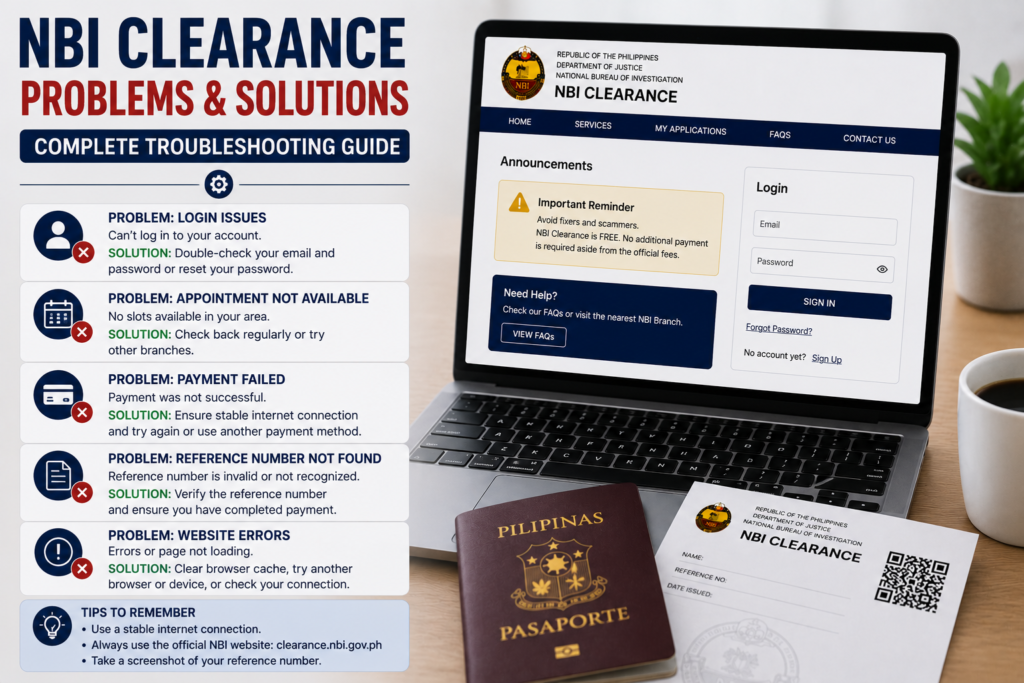
Before diving into specific solutions, here is a categorized overview of the NBI Clearance problems applicants encounter most frequently. Understanding which category your issue falls into helps you navigate directly to the right solution.
| Problem Category | Common Symptoms | Typical Resolution Path |
|---|---|---|
| Account Access | Cannot log in, forgot password, email not recognized | Password reset, email recovery, new account if needed |
| Payment Issues | Payment failed, payment pending, double charge | Wait 24 hours, contact payment channel, keep receipt |
| Appointment Booking | No slots, cannot select branch, booking errors | Check off-peak times, try satellite branches, refresh portal |
| Verification Delays | HIT status, prolonged “Under Verification” | Attend QC interview, provide additional documents |
| Document Errors | Wrong name, wrong birthdate, damaged clearance | Branch visit with correct documents, replacement application |
| Release Issues | Clearance not released, delivery not received | Check status online, visit branch, track courier |
Login and Account Access Problems
Login issues are among the most frustrating NBI Clearance problems because they block access to your entire application. Here are the specific issues and solutions.
Symptom: “Invalid Email or Password” Error
Cause: Incorrect credentials, caps lock enabled, or account does not exist under that email.
Solution: Double-check your email address for typos. Ensure caps lock is off. If certain your email is correct, proceed to password reset. If you never completed registration, you may need to create a new account.
Symptom: “Account Not Found” Error
Cause: You may have registered with a different email address, or your account was not fully activated.
Solution: Search all your email inboxes for the original NBI registration confirmation. Check spam folders. If no record exists, register anew with a valid email address.
Symptom: Cannot Access Old Account
Cause: Account inactivity, changed email, or forgotten credentials.
Solution: Use the password reset function. If you no longer have access to the registered email, you may need to create a new NBI account. Note that previous application records are tied to the old account and cannot be transferred. For renewal, creating a new account is acceptable; your biometrics will link your records.
Forgot Password and Password Reset Issues
Password problems are among the most common NBI Clearance issues reported by returning applicants.
Step-by-Step Password Reset
- Go to clearance.nbi.gov.ph and click “Forgot Password.”
- Enter your registered email address.
- Check your email inbox and spam folder for the reset link.
- Click the link and create a new strong password.
- Log in with your email and new password.
Problem: Password Reset Email Not Received
Cause: Email delay, spam filtering, or incorrect email address entered.
Solution: Wait 15 minutes. Check spam, promotions, and junk folders. Ensure you entered the exact email used during registration. If still not received, the email address may not be registered. Consider creating a new account.
Forgot Email Address and Account Recovery
Forgetting which email you used is a significant NBI Clearance problem because the system identifies you primarily by email.
Solution: Search all your email accounts for messages from “NBI Clearance” or “nbi.gov.ph.” Check your phone’s saved passwords or autofill settings for the NBI portal. If you cannot recover the email, you will likely need to create a new account. Any previous unpaid or incomplete application under the old account will be orphaned, but your biometrics record will link future applications to your identity.
Account Locked or Suspended
Cause: Multiple failed login attempts may trigger a temporary security lock. Suspension may occur if the system detects suspicious activity.
Solution: Wait 30 minutes to 2 hours for temporary locks to clear. Clear your browser cache and cookies, then try again. If the account remains locked after 24 hours, there is no direct online unlock mechanism. You may need to contact the NBI through their official channels or visit a branch for assistance with account reactivation.
Registration Errors and Data Validation Problems
Errors during initial registration are common NBI Clearance problems that can cascade into bigger issues later.
Symptom: “Email Already Registered”
Cause: An account already exists under that email address.
Solution: Use the “Forgot Password” function to recover the existing account. Do not create a duplicate account with a different email if you can recover the original. One account per applicant is the intended design.
Symptom: Form Validation Errors
Cause: Missing required fields, invalid date format, or special characters in name fields.
Solution: Fill in all required fields marked with an asterisk. Use the date picker for birthdates. Avoid special characters like periods, hyphens, or apostrophes in name fields unless they appear on your birth certificate exactly as such.
OTP and Verification Code Problems
One-Time Pin problems can stall your NBI Clearance troubleshooting at the earliest stage.
Cause: OTP not arriving, expired OTP, or wrong OTP entered.
Solution: Ensure your mobile number is entered correctly with the Philippines country code (+63). Wait 60 seconds before requesting a new OTP. Do not request multiple OTPs rapidly, as this can trigger a cooldown. If OTPs consistently fail, try registration during off-peak hours when server load is lower, typically early morning or late evening.
NBI Website Not Loading or Server Errors
Website downtime is a frequent NBI Clearance issue, especially during peak application periods.
Symptom: “503 Service Unavailable” or “Connection Timed Out”
Cause: NBI server maintenance, high traffic volume, or local internet connectivity issues.
Solution:
- Refresh the page after 5-10 minutes.
- Try accessing the portal during off-peak hours: early morning (6 AM – 8 AM) or late evening (10 PM onwards).
- Clear your browser cache and cookies, or try a different browser (Chrome, Firefox, Edge).
- Switch from mobile data to a stable Wi-Fi connection, or vice versa.
- Check if the official NBI social media pages have posted about scheduled maintenance.
Payment Failed or Payment Pending Issues
Payment-related NBI Clearance problems are stressful because money is involved. Here is how to handle them.
Payment Failed but Amount Deducted
Cause: Payment gateway timeout, but the transaction was processed by the bank or e-wallet.
Solution:
- Do not pay again immediately. Wait 24 hours for the system to reconcile.
- Keep your transaction receipt, reference number, and screenshot from GCash, Maya, or your bank app.
- Log in to the NBI portal after 24 hours to check if the status updated to “Payment Confirmed.”
- If still not updated, contact the payment channel’s customer support with your transaction details. They can confirm if the payment settled on their end.
- As a last resort, visit the NBI branch with your payment proof. Branch personnel may manually verify and update your status.
Payment Successful but Status Not Updated
Cause: Delayed reconciliation between the payment gateway and the NBI system, common with over-the-counter payments.
Solution: Over-the-counter payments (7-Eleven, Bayad Center) can take up to 24 hours to reflect. E-wallet payments typically update within minutes. If exceeding 48 hours, visit the NBI branch with your official receipt. For complete payment guidance, see NBI Clearance fee and payment channels.
Reference Number Lost or Not Recognized
The reference number is the single most critical piece of data in NBI Clearance troubleshooting. Losing it creates significant problems.
Solution:
- Log in to your NBI account and check “My Appointments” or “Transaction History.” The reference number is displayed there.
- Search your email inbox for the appointment confirmation email from NBI.
- Check your phone’s screenshot gallery if you captured the confirmation page.
- If completely lost, visit the NBI branch where you applied. Bring your valid ID. Personnel can search for your application using your full name and birthdate, though this process takes longer.
Appointment Booking Problems
Appointment-related NBI Clearance problems prevent you from even starting the biometrics process.
Unable to Select Branch
Cause: The branch dropdown may not load due to slow internet, or the branch may be temporarily closed for applications.
Solution: Refresh the page. Try a different browser. If the branch consistently does not appear, it may be offline. Select an alternative branch from our NBI Clearance branches directory.
No Available Appointment Slots
“No slots available” is arguably the most complained-about NBI Clearance problem in Metro Manila and other urban centers.
Solution:
- Check early morning. Slots are often released or become available when the system refreshes, typically between 6 AM and 8 AM.
- Expand your radius. Consider satellite offices and mall-based branches in neighboring cities. A 30-minute commute to a less crowded branch can save weeks of waiting.
- Check on weekdays. Weekend slots are the first to fill.
- Be persistent. Cancellations happen. Refresh the appointment calendar multiple times during the day.
Read our detailed guide on NBI appointment online booking for more strategies.
Missed Appointment Problems
Missing your scheduled appointment is a costly NBI Clearance issue.
Consequence: Your slot is forfeited. The appointment fee is non-refundable.
Solution: Log in to the portal and check if the system allows you to reschedule using the same payment. In most cases, you will need to book a new appointment and pay the fee again. There is no appeal process for missed appointments except in extreme circumstances like natural disasters. Book a new appointment immediately to minimize delay. Learn more in NBI Clearance appointment scheduling.
Appointment Rescheduling and Cancellation Problems
Symptom: “Reschedule” button grayed out or unavailable.
Cause: Your appointment date has already passed, or the system does not allow rescheduling for your application stage.
Solution: Rescheduling is only available before your scheduled date. If the date has passed, you must book a new appointment. Some payment linkages may block rescheduling; in such cases, cancellation and rebooking with a new payment is the only path.
Biometrics Capture Problems
Problems during the biometrics appointment can derail an otherwise smooth application.
Fingerprint Not Capturing Clearly
Cause: Dry skin, worn fingerprints (common in manual laborers), or residue on fingers.
Solution: Apply lotion to hands before your appointment if you have dry skin. Inform the NBI personnel if the scanner repeatedly fails; they may use alternative fingers or a different scanner. This is usually resolvable on the spot.
Photograph Rejected
Cause: Glare from eyeglasses, inappropriate expression, or hair covering facial features.
Solution: Remove eyeglasses for the photo. Maintain a neutral expression with eyes open and mouth closed. Pull back hair that obscures your face. The NBI officer will guide you.
HIT Status Problems and Solutions
HIT status is the most anxiety-inducing NBI Clearance problem for most applicants. It is essential to understand it fully.
What Is HIT Status?
A HIT occurs when the NBI’s automated background verification system finds a name match—or a name similar to yours—in its criminal or investigative records database. HIT does not mean you have a criminal record. It means the system requires a human evaluator to verify whether the database record belongs to you or to a different person who shares your name.
How to Solve HIT Status
- Check your NBI portal for instructions. The system typically schedules a Quality Control (QC) interview.
- Attend the QC interview on the specified date. Bring multiple valid IDs and any court clearances or certifications if applicable.
- Answer the verifying officer’s questions honestly. They will ask about your personal history, previous addresses, and any involvement in legal cases to distinguish you from the namesake.
- If cleared after QC, your clearance proceeds to printing. If further verification is needed, expect additional waiting days.
For an exhaustive guide, read NBI Clearance HIT status explained.
Background Verification and Processing Delays
Prolonged “Under Verification” status is among the most common NBI Clearance problems causing applicant anxiety.
Causes: Name HIT, incomplete data, system backlog, or complex cases requiring cross-agency verification.
Solutions by Timeline:
- 1-3 days: Normal processing window. No action needed.
- 4-7 days: Check your NBI portal and email for QC interview notices. A HIT may be in progress.
- 1-2 weeks: Visit the NBI branch with your reference number and valid ID. Inquire about your application status in person.
- Over 2 weeks: Escalate to the branch supervisor or the NBI main office. Bring all documentation including payment proof and appointment confirmation.
Track your status using our NBI Clearance status tracking guide.
Document and Identity Mismatch Problems
Identity verification failures are serious NBI Clearance issues that halt processing immediately.
Symptom: Valid ID Rejected at Biometrics
Cause: Expired ID, ID not in the accepted list, name mismatch between ID and application, or photo discrepancy.
Solution:
- Ensure your ID is current and not expired. Expired IDs are not accepted under any circumstances.
- Verify your ID is on the official accepted list. Check NBI Clearance requirements for the complete valid ID catalog.
- Your application name must match your ID exactly. Even a missing middle initial can cause rejection.
- Bring a backup valid ID. If your primary ID is questioned, present the secondary one.
Incorrect Personal Information on NBI Clearance
Discovering wrong details on your issued clearance is a frustrating NBI Clearance problem that requires correction.
Wrong Name Spelling
Solution: Return to the NBI branch where the clearance was issued. Bring the incorrect clearance, your birth certificate (original PSA copy), and valid ID showing the correct name. The branch can verify the error and reissue a corrected clearance. This typically involves a new biometrics capture and possibly a new payment.
Wrong Birthdate
Solution: Same process as name correction. Present your PSA birth certificate as definitive proof. Ensure your birth certificate is the PSA-authenticated version, not a local civil registry copy.
Damaged or Lost NBI Clearance
A damaged or lost clearance is a common NBI Clearance problem with a defined replacement process.
Solution for Damaged Clearance: If the clearance is partially legible and the QR code is intact, it may still be valid for verification. If severely damaged, apply for a replacement at an NBI branch. Bring the damaged copy and a valid ID. A replacement fee applies.
Solution for Lost Clearance: File an affidavit of loss. Visit the NBI branch with the affidavit and valid ID to request a reissuance. You may need to undergo biometrics verification again. The replacement fee is typically the same as a new application. Read NBI Clearance replacement for full instructions.
NBI Clearance Renewal Problems
Renewal applicants face unique NBI Clearance problems distinct from first-timers.
Symptom: System Treats Me as New Applicant
Cause: Using a different email account, or changes in personal data since the last application.
Solution: If possible, log in with the email used for your previous clearance. Select “Renewal” during the application type selection. If you must use a new account, your biometrics will link your records. For full guidance, see NBI Clearance renewal guide.
Release Delays and Claiming Problems
When your clearance shows “Ready for Release” but you cannot obtain it, specific NBI Clearance troubleshooting applies.
Clearance Not Yet Printed at Branch
Solution: The status may have updated before physical printing. Wait at the branch or return the next working day. Printer malfunctions are a common cause of same-day delays.
Courier Delivery Not Received
Solution: Check your NBI portal for a courier tracking number. Contact the courier directly. If no tracking number exists, visit the branch to inquire. Delivery typically takes 3-7 working days within Metro Manila, longer for provincial addresses. See NBI Clearance delivery tracking.
Employer Verification Questions and Issues
Employers sometimes encounter problems verifying NBI Clearances, which creates issues for the applicant.
Problem: Employer cannot verify the QR code or the clearance appears invalid.
Solution: Ensure the clearance is not expired. The QR code requires an internet-connected device with a QR scanner. Ask the employer to try a different QR scanning app. If the problem persists, the employer can contact the NBI directly for verification. Provide a clear photocopy of your clearance. For employment-specific clearance concerns, read NBI Clearance for employment.
Expert Troubleshooting Tips for NBI Clearance Problems
- Screenshot everything. Capture every stage of your application: registration, payment, appointment confirmation, and status updates. These serve as evidence when problems arise.
- Keep all receipts. Payment receipts are your strongest proof if a payment problem occurs.
- Use a consistent email and phone number. Changing contact details mid-application causes communication breakdowns.
- Visit branches during off-peak hours. For in-person problem resolution, arrive when the branch opens (typically 8 AM) on a weekday to minimize waiting.
- Be polite but persistent. NBI personnel are more inclined to help applicants who are respectful and prepared.
- Escalate systematically. Start with the portal, then email, then branch visit, then supervisor escalation.
Preventing Future NBI Clearance Problems
Prevention is better than cure. Avoid common NBI Clearance problems with these proactive measures:
- Register with a permanent email address. Avoid temporary or work emails you may lose access to.
- Save your reference number in multiple locations. Cloud storage, email draft, physical notebook, and your phone’s notes app.
- Apply weeks before you need the clearance. Do not wait until the deadline. Buffer time absorbs unexpected delays.
- Verify all data before submission. A 60-second review of your application form prevents weeks of correction headaches.
- Bring a backup valid ID to your appointment. An extra ID can rescue a rejected primary ID situation.
Problem Scenarios: First-Timers, Renewals, OFWs, and Foreign Nationals
First-Time Applicants
First-timers often encounter registration errors and valid ID confusion. Ensure your ID is on the accepted list and matches your registration data exactly. First-timers with common names should anticipate possible HIT status and prepare multiple IDs.
Renewal Applicants
Login problems dominate renewal issues because applicants forget credentials used years prior. Use the password reset function. If your old email is inaccessible, create a new account. Read NBI Clearance renewal.
Overseas Filipino Workers (OFWs)
OFWs face tight timelines. Any problem causing delay risks departure schedules. Apply as early as possible during your vacation. Opt for courier delivery if you cannot return to claim. Authorize a representative with a Special Power of Attorney if needed.
Foreign Nationals
Foreigners may experience extended verification due to cross-referencing with immigration databases. Ensure ACR I-Card details match the application precisely. Delays beyond three weeks warrant a branch inquiry with passport and ACR card.
Frequently Asked Questions About NBI Clearance Problems and Solutions
- What are the most common NBI Clearance problems?
- Login failures, payment pending status, no available appointment slots, HIT status delays, and lost reference numbers are the top five issues.
- How do I fix NBI Clearance login problems?
- Use the “Forgot Password” function. Check your email spam folder. If your email is not recognized, you may need to register a new account.
- Why is my NBI payment still pending?
- Over-the-counter payments can take up to 24 hours. E-wallet payments usually confirm within minutes. Keep your receipt and wait before taking further action.
- What does HIT status mean?
- HIT means your name matched a record in the NBI database, triggering manual verification to determine if the record belongs to you or a namesake.
- Why is my NBI Clearance delayed?
- Common causes include name HIT, incomplete data, system backlog, or branch-specific operational issues.
- How do I change my NBI appointment?
- Log in to the portal, go to “My Appointments,” and use the reschedule function before your appointment date.
- How do I recover my NBI account?
- Use the password reset link. If you lost access to your email, you may need to create a new account.
- How do I correct incorrect personal information on my clearance?
- Return to the issuing NBI branch with your birth certificate and valid ID. The branch can verify and reissue a corrected clearance.
- What if I lost my NBI reference number?
- Log in to your account to retrieve it. If inaccessible, visit the NBI branch with your valid ID.
- Why is the NBI website not loading?
- Server overload during peak hours or maintenance. Try early morning or late evening. Clear browser cache or switch browsers.
- What if my payment was deducted but my appointment was not confirmed?
- Wait 24 hours for reconciliation. Keep your payment receipt. If unresolved, contact your payment provider, then visit the NBI branch with proof.
- Can I get a refund for a failed NBI appointment?
- The NBI appointment fee is generally non-refundable. Exceptions are rare and handled on a case-by-case basis at the branch.
- What if my ID is expired on appointment day?
- You will be turned away. Renew your ID first, then book a new NBI appointment. Check requirements for alternatives.
- How do I reschedule a missed NBI appointment?
- You cannot reschedule a missed appointment. You must book a new appointment and pay the fee again.
- Why does my name appear with a HIT when I have no criminal record?
- A HIT is a name match, not a criminal conviction. It means someone with a similar or identical name has a record in the database.
- What should I bring to a QC interview for HIT resolution?
- Multiple valid IDs, any court clearances if applicable, and your appointment reference number.
- How long does HIT verification take?
- Typically 3-10 working days after the QC interview, though complex cases may extend longer.
- Can I apply for NBI Clearance while a previous application is pending?
- No. The system links applications to your identity. Wait for the current application to resolve before filing a new one.
- What if my NBI Clearance was printed with errors?
- Do not accept it. Point out the error immediately at the releasing section. If you discover it later, return to the branch with your birth certificate.
- How do I replace a lost NBI Clearance?
- File an affidavit of loss, visit an NBI branch with the affidavit and valid ID, and apply for a replacement. A fee applies.
- Why can’t I select my preferred NBI branch?
- The branch may be temporarily closed, fully booked, or not appearing due to a loading error. Refresh the page or try a different browser.
- What if the NBI portal shows my status as “Claimed” but I haven’t claimed it?
- Contact the NBI branch immediately. This could be an administrative error requiring investigation.
- How do I contact the NBI about my application problem?
- Check the NBI official website for contact numbers and email addresses. We cannot provide official NBI support.
- Can NBI Online Clearance PH fix my application problem?
- No. We are an educational resource. We have no access to NBI systems. All official problems must be resolved through NBI channels.
- What is the fastest way to resolve an NBI Clearance problem?
- For most persistent problems, visiting the NBI branch in person with your reference number, valid ID, and payment receipt yields the fastest resolution.
- Why did I not receive an OTP during registration?
- Check your mobile number format, ensure signal reception, and wait before requesting a new OTP. Try during off-peak hours.
- Can I use the same email for multiple NBI accounts?
- No. Each email address can register only one NBI Clearance account.
- What if my biometrics fingerprints won’t scan?
- Inform the NBI officer. They have procedures for alternative capture. Dry skin can be mitigated with lotion applied beforehand.
- How do I track my NBI Clearance delivery?
- Check your NBI portal for a courier tracking number. If none exists, visit the branch. Delivery takes 3-7 working days typically.
- What if the NBI Clearance QR code doesn’t work?
- Try a different QR scanning app. Ensure the clearance is not expired. If still failing, contact the NBI branch for verification.
- Why is my NBI Clearance “Under Verification” for weeks?
- A prolonged “Under Verification” strongly suggests a HIT that requires your QC interview attendance. Check your portal and email for schedules.
- Can foreign nationals resolve NBI Clearance problems online?
- Some issues like login and payment can be resolved online. Verification and document issues typically require a branch visit with passport and ACR I-Card.
- What time does the NBI portal release new appointment slots?
- Slots are often refreshed early morning, between 6 AM and 8 AM Philippine time. Checking during this window improves your chances.
- Is there a customer service hotline for NBI Clearance problems?
- The NBI provides contact channels through its official website. Response times vary. In-person branch visits are often more immediate.
- Why does this guide say it’s not affiliated with the NBI?
- NBI Online Clearance PH is an independent informational website. We provide guidance but are not part of the NBI and cannot access its systems.
Why Trust This NBI Clearance Problems and Solutions Guide
This troubleshooting guide was compiled through rigorous research of official NBI system documentation, analysis of applicant-reported issues across Philippine NBI branches, and verification against the current NBI Clearance portal behavior as of 2026. Our editorial team consults NBI public advisories and relevant Philippine regulations to ensure solution accuracy. We maintain an Editorial Policy prioritizing factual correctness and user empowerment. This article is updated whenever the NBI modifies its application system or announces new procedural protocols.
Editorial and Fact-Checking Process
- Fact Checked: July 27, 2026 by NBI Online Clearance PH Editorial Team.
- Last Updated: July 27, 2026.
- Review Cycle: Bimonthly or upon official NBI system updates.
- Corrections Policy: We promptly correct verified inaccuracies. Report errors to contact@nbionlineclearance.ph.
Official References
Conclusion: Solving NBI Clearance Problems with Knowledge and Persistence
Every NBI Clearance problem has a solution. Whether you are locked out of your account, grappling with a payment that won’t confirm, facing a HIT status, or holding a clearance with incorrect details, the path to resolution exists. The key is understanding the specific issue, following the correct procedural steps, and knowing when to escalate from online self-service to an in-person branch visit. Bookmark this NBI Clearance problems and solutions guide as your troubleshooting companion throughout your application journey.
Disclaimer: NBI Online Clearance PH is an independent informational resource. We are not a government entity and cannot access NBI systems, resolve individual application problems, or intervene in official NBI processes. Always refer to the official NBI portal at clearance.nbi.gov.ph or visit an NBI branch for authoritative problem resolution.